Building from Source
This page covers building the engine from source on Windows. Install the toolchain first — almost every build failure reported against Vite turns out to be a toolchain problem, not a code problem.
If you have never built Unreal Engine from source before, Epic's Visual Studio setup guide for 4.27 is still the best background reading.
Guided build with ViteSetup
The repository root ships ViteSetup.bat, an assistant that runs the whole flow in order: environment check, toolchain enforcement, dependency setup with platform selection, project file generation, source or binary build, engine registration, desktop shortcut, and optional debloat.
For the advanced menu, which lets you run any single step on its own:
The assistant is the recommended path for a first build because it catches missing prerequisites before you spend twenty minutes compiling. See ViteSetup Assistant for a full walkthrough of its screens and options.
Manual build
If you would rather drive the steps yourself, this is what the assistant is doing.
1. Download dependencies
GitDeps is already patched in this fork, so no manual edits are needed. When the script asks whether to overwrite local changes, answer N.
Setup.bat accepts -exclude= arguments to skip platforms and content you do not need, which substantially reduces download size and disk usage. A Win64-only setup looks roughly like this:
ViteSetup.bat exposes these as named presets — Recommended Win64, Win64 ultra compact, Win64 + templates / feature packs, Win64 + Android, Win64 + Linux and Full setup — and will print the exact Setup.bat command line for each one from its Show setup profiles menu entry.
2. Generate project files
This produces UE4.sln in the repository root.
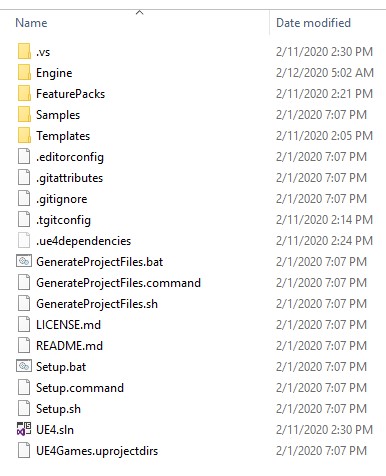
UE4.sln appears alongside the setup scripts once generation succeeds. If it is missing, generation failed — read its output rather than opening Visual Studio.
3. Build
Open UE4.sln and set UE4 as the startup project if it is not already. Build the Development Editor configuration for Win64.
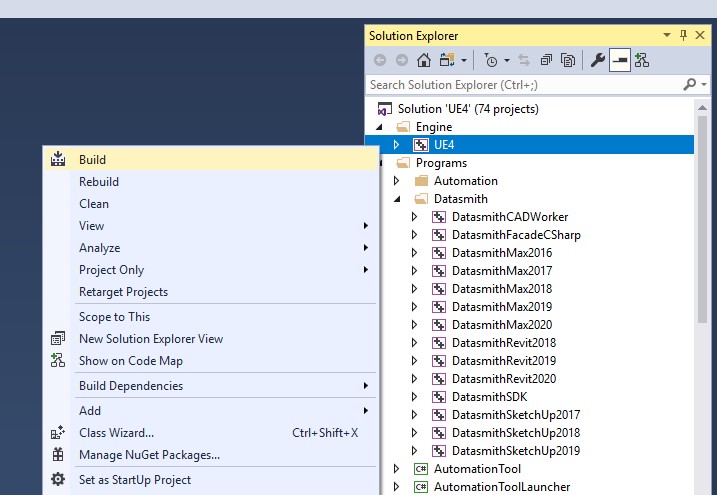
Build UE4 under Engine, not the solution. Building the whole solution compiles program targets you do not need for an editor build.
From the command line, the equivalent is:
All three targets are needed for a working editor. ViteSetup.bat builds them in this order.
4. Register the engine
So that .uproject files can find this build, register it under the current user's Unreal Engine build key:
Then set "EngineAssociation": "UE_ViteFork" in your project's .uproject file. The assistant does this step for you and also cleans up stale GUID-keyed entries that point at the same folder.
Build times
Compile time is dominated by core count. As a reference point, a full build of the repository on a Ryzen 9 9950X3D takes about 15 minutes; removing the bundled Vite plugins brings that down to about 12 minutes, with the Houdini plugin accounting for most of the difference. See Debloat Guide if iteration speed matters more to you than plugin coverage.
Producing an installed build
Once a source build works, you can turn it into a redistributable installed build for the rest of the team. RunUAT.bat in the repository root runs the BuildGraph Make Installed Build Win64 target and writes the result to LocalBuilds\Engine\Windows\:
See Installed Builds for the full set of options and Packaging and Distribution for the compression scripts.