Physics Cube Bench
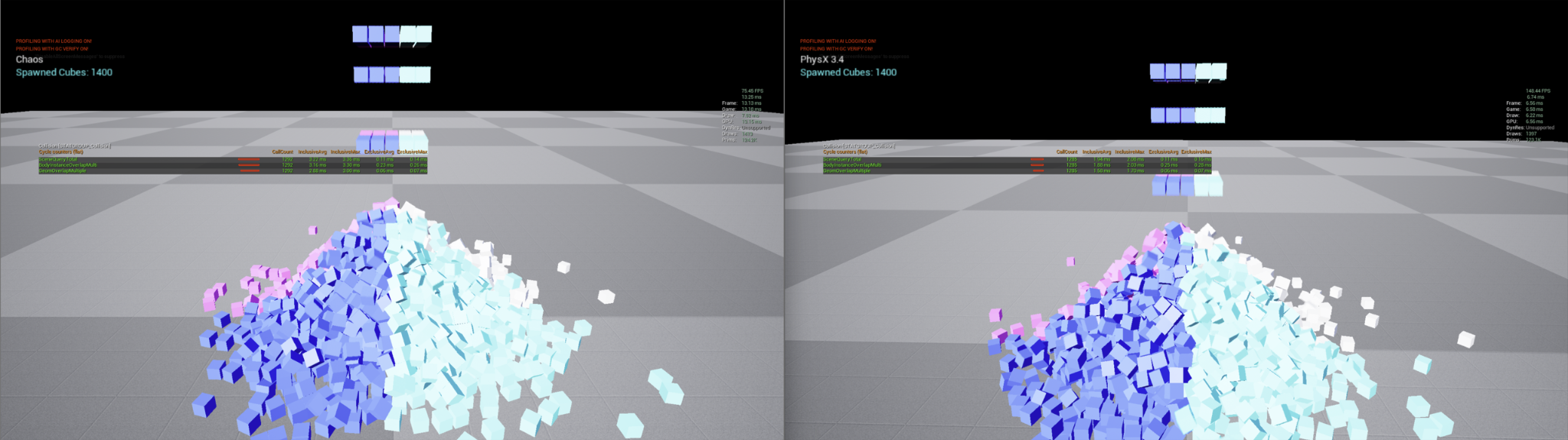
1400 simulated cubes, identical scene. Chaos (left) 75.45 FPS at a 13.25 ms frame; PhysX 3.4 (right) 148.44 FPS at a 6.74 ms frame.
Download
What it measures
Simple rigid bodies simulated conventionally: one actor per body, each with its own component, transform and tick. It establishes how many PhysX bodies you can simulate before the frame budget runs out using the standard workflow.
The interesting part is not the number, it is where it stops scaling and why. Two costs grow with body count and they grow differently:
Cost | Grows with |
|---|---|
PhysX solver | Bodies actually in contact and awake |
Actor and component overhead | Total body count, whether or not anything is moving |
The second one is what the PhysX Instanced Subsystem eliminates. Comparing this benchmark against the instanced subsystem demo shows the difference directly.
Running it
stat unit first, then:
Command | Shows |
|---|---|
| Solver time |
| Actor tick and component overhead |
| Constraint visualisation |
If Game exceeds Physics by a wide margin, actor overhead rather than the solver is your limit, and the instanced path is the answer.
PhysX versus Chaos
Vite retains PhysX rather than migrating to Chaos. On this class of workload PhysX is the faster and more predictable solver, which is part of why. See PhysX.
If you need frame-rate-independent determinism from this kind of simulation, Vite's optional fixed timestep applies — it requires rebuilding with VITE_PHYSX_FIXED_TIMESTEP=1.