Physics
Vite treats physics as a frame-time-critical engine system. Simulation cost includes more than the solver: broad phase, contact generation, island construction, constraint preparation, iterative solving, integration, callbacks and synchronization with engine state all contribute to the final physics time.
What is in this section
Topic | Covers |
|---|---|
PhysX 3.4 features, Vite extensions, configuration and profiling | |
Fixed-step simulation with render interpolation | |
APEX Destruction, APEX Cloth and NVIDIA Blast | |
Simulating large rigid-body sets through instanced meshes |
Physics CPU architecture
Threading and the critical path
PhysX and Chaos both support multithreaded simulation. Chaos can execute through the Task Graph, use a dedicated physics thread and parallelize selected particle, collision and island work. A dedicated thread moves work away from the game thread, but it does not by itself reduce the time between starting and finishing a simulation step.
Physics contains ordered phases and data dependencies. Constraints within a connected island cannot all be solved independently, and later stages must wait for the state produced by earlier stages. Scaling therefore depends on the number and size of independent islands, task granularity, synchronization frequency and the amount of state transferred between the game and physics representations.
PhysX 3.4 exposes a dependency-linked TaskManager and CpuDispatcher. Simulation stages create LightCpuTask jobs and submit them to the engine worker pool as their prerequisites complete. Vite's Unreal integration can batch dispatcher submissions to trade scheduling overhead against available parallelism. NVIDIA's PhysX 3.4 threading documentation
SIMD coverage
Chaos contains optional Intel ISPC kernels. ISPC is a SIMD technology: it compiles an SPMD program for the vector units of the target CPU. The relevant constraint is coverage and utilization, not "ISPC versus SIMD." Only work implemented by an ISPC kernel receives that vector path. Divergent contacts, indirect memory access, gathers and scatters, heterogeneous constraint types and pointer-heavy data reduce effective lane occupancy. Intel's ISPC documentation describes the compiler and its SIMD execution model.
PhysX's narrow phase and solver were developed around batched float data and platform SIMD kernels. The useful measurement is effective vector occupancy across the complete simulation step, including work that remains scalar or loses time to data movement.
Numeric precision
UE5 Large World Coordinates changed core world-space types to double precision. Epic's LWC documentation explicitly documents double precision in Chaos destruction. This does not mean that every field in every Chaos subsystem is FP64. Modern Chaos uses mixed precision in selected paths, while the experimental Chaos implementation in the UE4.27 base aliases its primary FReal to float.
Double precision remains SIMD-capable. A fixed-width register, however, carries half as many doubles as floats: a 256-bit register holds four 64-bit values or eight 32-bit values. Double-based fields also require twice the storage and memory bandwidth of equivalent float fields. In affected kernels this can reduce theoretical element throughput, increase cache pressure and add conversion work at float/double boundaries. Epic's LWC conversion guide documents both VectorRegister4f and VectorRegister4d; the constraint is lane width and data cost, not an absence of vector instructions.
There is no accurate universal percentage for the FP64 cost. Scalar FP32 and FP64 instructions can have similar latency on some CPUs, while vector-throughput- or bandwidth-bound kernels can experience a much larger difference. Any percentage must be attached to a named workload, platform and build.
Box Container Pile 10K benchmark
The supplied reports measure a deliberately physics-bound pile containing 10,005 active rigid bodies and 10,005 shapes. Rendering is removed(except for Chaos), sleeping is disabled and both runs use four solver iterations, a 60 Hz simulation step, 30 warm-up steps and 300 measured steps. The metric is median physics milliseconds per frame; lower is better.
Test property | Reported configuration |
|---|---|
Host | Intel Core i7-13700K (8P+8E / 24 threads), maximum 3.40 GHz |
Memory | 64 GB DDR5-4800 |
Platform | Windows 11 Pro for Workstations x64, build 10.0.26200 |
Workload | Headless; 10,005 bodies; 10,005 shapes; rigid-body sleeping disabled |
Solver | Four iterations; 60 Hz |
Sampling | 300 measured steps after 30 warm-up steps |
Chaos build | Unreal release-branch Chaos Program target; Win64 Shipping; one reported repeat |
NVIDIA PhysX build | NVIDIA PhysX 3.4; Visual Studio 2026 MSBuild Release; SDK and runner; ten reported repeats |
Vite PhysX build | Vite PhysX 3.4; clang-cl 22 Release; runtime DLLs; ten reported repeats |
Matching thread-count results
Reported threads | Unreal Chaos | NVIDIA PhysX 3.4 | Vite PhysX 3.4 | Chaos / Vite | NVIDIA / Vite |
|---|---|---|---|---|---|
1 | 1,052.09 ms | 49.61 ms | 35.60 ms | 29.55× | 1.39× |
3 | 1,051.41 ms | 21.98 ms | 15.95 ms | 65.92× | 1.38× |
4 | 951.36 ms | 18.94 ms | 14.17 ms | 67.14× | 1.34× |
5 | 857.89 ms | 17.09 ms | 12.47 ms | 68.80× | 1.37× |
6 | 791.97 ms | 15.82 ms | 11.76 ms | 67.34× | 1.35× |
Vite PhysX improves from 35.60 ms at one reported thread to 11.76 ms at six, a 3.03× throughput increase. NVIDIA PhysX 3.4 improves from 49.61 ms to 15.82 ms, a 3.14× increase, while Chaos improves from 1,052.09 ms to 791.97 ms over the same range, a 1.33× increase. The Chaos report continues to 24 threads and reaches 581.25 ms, 1.81× the throughput of its one-thread result.
At matching thread counts, Chaos takes 21.21× as long as stock NVIDIA PhysX at one thread and 50.06× as long at six threads. NVIDIA PhysX takes 1.34–1.39× as long as Vite PhysX across the shared thread counts; equivalently, Vite reduces the reported median physics time by 25.2–28.2% relative to the NVIDIA PhysX 3.4 baseline. Vite PhysX enters the 16.67 ms budget for 60 Hz at three threads, and NVIDIA PhysX enters it at six. The reported Chaos result remains outside that budget at 24 threads.
The one-thread result shows that task scaling cannot explain the complete gap: the reported physics time is already 29.55× as long for Chaos as for Vite PhysX and 21.21× as long for Chaos as for NVIDIA PhysX before additional worker scaling. The multi-thread results show that scaling widens a difference that also includes solver work, data access, collision and constraint processing, build configuration and engine integration. The stock NVIDIA result also separates the base PhysX architecture from the additional improvements in Vite's PhysX build.
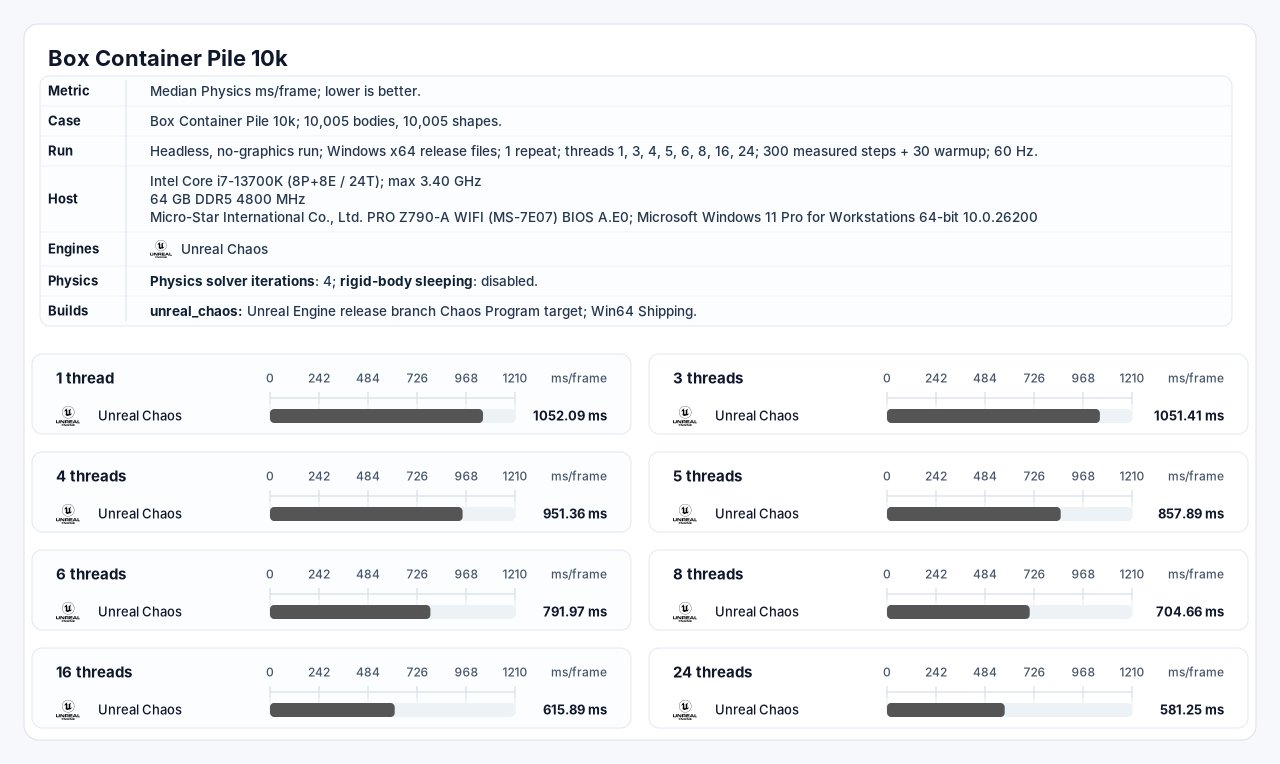
Unreal Chaos report. Median physics milliseconds per frame; lower is better.
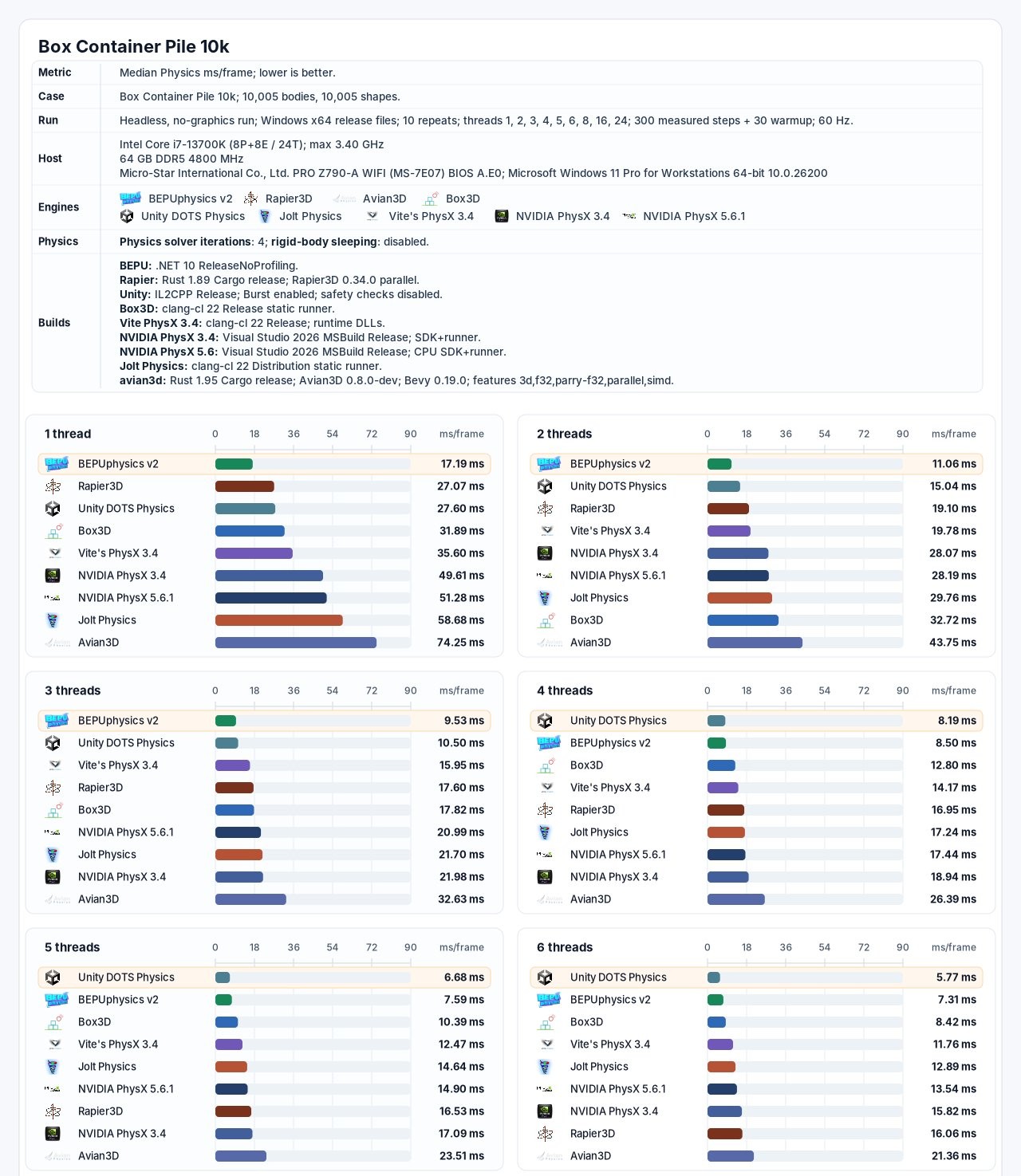
Vite PhysX and comparison-engine report. The shared table above uses only thread counts reported for Chaos, NVIDIA PhysX 3.4 and Vite PhysX 3.4 in the supplied reports.
Reproducing the comparison
For a controlled engine decision:
Pin both engine and benchmark-project commits.
Use equivalent compiler optimization, checks, logging and instrumentation.
Match collision shapes, material settings, solver iterations, sleeping, timestep and event generation.
Record thread affinity and P-core/E-core placement on hybrid CPUs.
Publish raw frame samples, median, percentiles and variance.
Capture the solver critical path and worker utilization with the appropriate CPU profiler.
Repeat with a representative production scene; a fully awake 10,005-body pile is a stress workload.
In-engine cube workload
The Vite PhysX Cube Test complements the headless solver report with a workload that runs inside Unreal Engine. The public cube-spawner implementation creates one UStaticMeshComponent per cube, registers it with the engine and enables simulation through SetSimulatePhysics(true). The spawner itself is a single AActor, so this measures an engine-managed component path rather than 3,000 separately spawned Unreal Actors.
3,000 engine-managed cubes
The matched capture reports 3,000 spawned cubes and 3,016 rendered primitives in both engine variants. Unlike the Box Container Pile 10K runner, these values include the surrounding Unreal runtime work and are not physics-solver milliseconds in isolation.
Reported metric | Unreal 5.7 — Chaos | Unreal Vite 26 — PhysX 3.4 | Vite relative result |
|---|---|---|---|
Spawned cubes | 3,000 | 3,000 | Matched |
Rendered primitives | 3,016 | 3,016 | Matched |
FPS | 33.26 | 157.88 | 4.75× as high |
Frame time | 30.07 ms | 6.33 ms | 78.9% lower |
Game time | 30.01 ms | 6.11 ms | 79.6% lower |
The captured Chaos game time is 4.91× the Vite PhysX game time, while its frame time is 4.75× the Vite PhysX frame time. Game time accounts for almost the complete frame in both captures, so the result is CPU-side rather than a GPU-limited comparison.
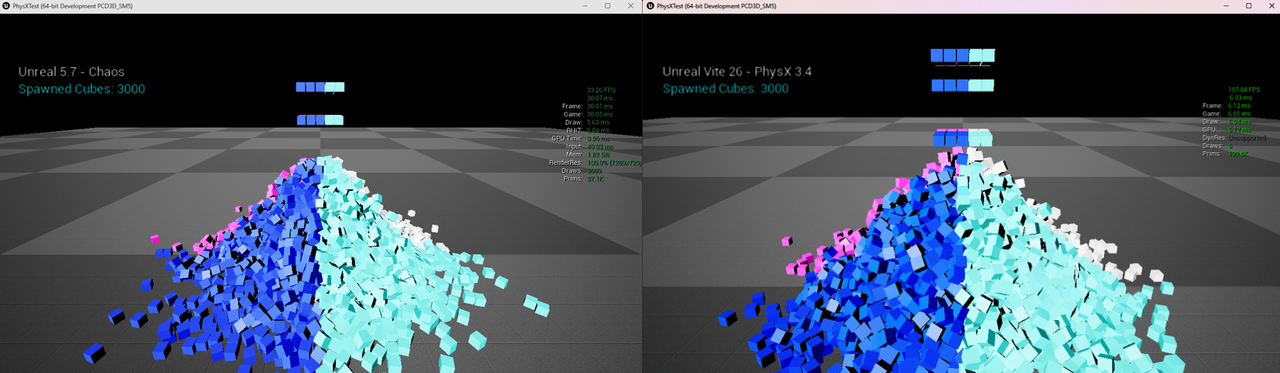
In-engine 3,000-cube capture. Both sides report 3,016 rendered primitives.
1,425 native PhysX actors
The native-path capture represents simulated cubes directly as PhysX actors instead of giving every body a separate Unreal AActor. This removes the per-body Unreal Actor lifecycle from the simulation representation while the scene continues to run and render inside Unreal Engine. Any remaining render representation and transform-bridge cost depends on the native integration.
Reported metric | Native PhysX actor path |
|---|---|
Engine label | UE Vite — PxActors |
Spawned cubes | 1,425 |
Rendered primitives | 1,447 |
FPS | 374.28 |
Frame time | 2.67 ms |
Game time | 2.11 ms |
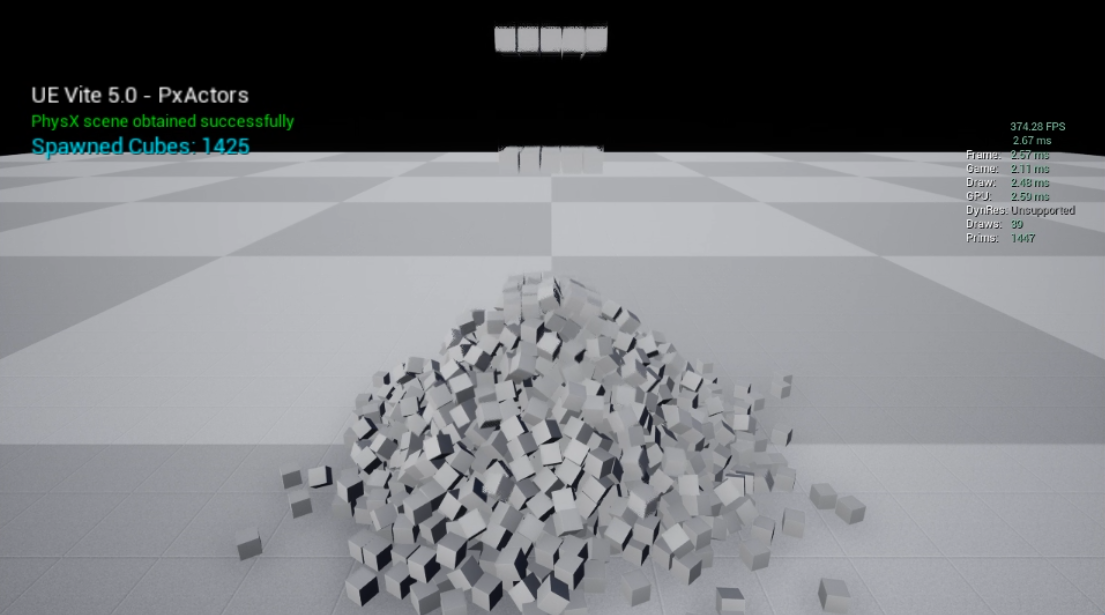
Native PhysX actor capture running in Unreal Engine without a separate UE Actor representation for each simulated cube.
Practical starting points
Set up physics for a new project
Review the PhysX feature and configuration reference.
Configure substepping under Project Settings > Engine > Physics when fast-moving or heavily constrained bodies require smaller simulation steps.
For a fixed simulation cadence, read Fixed Timestep before authoring systems around variable frame delta.
For large sets of debris, shells or other repeated bodies, evaluate the Instanced Physics Subsystem.
PhysX behaves best with a consistent frame rate. At very high or uneven frame rates, stuttering can occur, so cap the FPS for steadier frame pacing. Setting MaxDepenetrationVelocity to around 100 can also help reduce stutter caused by uneven frame pacing.
Reference workloads
Physics Cube Bench — in-engine rigid-body throughput
PhysX Instanced Subsystem demo — instanced simulation at scale
400 Characters CMC Bench — character movement and physics-query cost