Ray Tracing
Ray tracing in Vite is an engine-agnostic pipeline: acceleration structures are maintained independently of any single lighting solution, so each effect can be enabled or disabled on its own. This is the arrangement UE 4.27 had and UE 5.1+ moved away from — see Why NvRTX 4.27.
Availability
The VITE_RT_PSO_DEBLOAT compile-time switch defaults to 1 and removes shader permutations for effects outside Vite's recommended configuration. Ray tracing PSOs must be compiled and bound whether or not their console variable is set, so leaving unused effects compiled in costs shader build time, package size and pipeline creation time for nothing.
The practical consequence: setting the console variable for a compiled-out effect appears to succeed and renders nothing.
Effect | Console variable | Default build | Page |
|---|---|---|---|
Reflections |
| Available | |
Shadows |
| Available | |
Ambient occlusion |
| Available | |
Sky light |
| Available | This page |
Translucency |
| Compiled out | |
Mesh caustics |
| Compiled out | |
Water caustics |
| Compiled out | |
Sampled direct lighting (RTXDI) |
| Compiled out | |
Per-pixel global illumination |
| Compiled out | This page |
Reflection captures and probes |
| Compiled out | |
Path tracing |
| Compiled out |
To use anything in the compiled-out set, rebuild with VITE_RT_PSO_DEBLOAT=0. See Compile-Time Switches.
Reflections have one further caveat even when available: the debloat switch forces the sorted deferred reflection algorithm and compiles out the older non-deferred path.
Dynamic DDGI is a separate system, enabled through r.GlobalIllumination.ExperimentalPlugin rather than the r.RayTracing.* group, and is not affected by the debloat switch. See Dynamic DDGI.
This is the rendering stack Black Myth: Wukong shipped on.
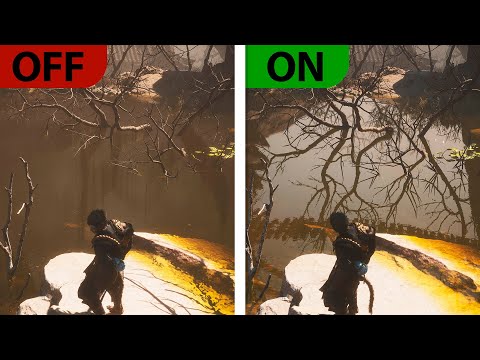
Enabling and disabling
From code:
From configuration, which is what shipping projects should use:
r.RayTracing.ForceAllRayTracingEffects 1 turns everything on at once. Treat it as a diagnostic — a way to see the ceiling and to audit which effects a scene responds to — not as a shipping setting. r.RayTracing.ForceAllRayTracingEffects 0 forces everything off, which is the fastest way to establish how much of your frame time ray tracing accounts for.
Culling and cost control
Ray tracing cost scales with how much geometry is in the acceleration structure, so culling is the first lever to reach for before reducing effect quality.
This makes ray tracing culling respect each primitive's minimum draw distance, which is a cheap and generally safe win in scenes with a lot of small detail meshes.
Beyond culling, the standard levers in rough order of effectiveness:
Reduce the number of effects enabled. Turning an effect off is always cheaper than optimising it.
Reduce effect resolution — most effects support half or quarter resolution buffers.
Reduce sample counts and maximum bounce depth.
Reduce the geometry that participates in ray tracing, per-primitive.
AMD hardware
Vite integrates AMD GPUOpen RT optimizations and a number of custom AMD RDNA specific GPU optimizations targeted at consoles. Ray tracing performance on RDNA2 hardware is a first-class concern rather than an afterthought, which follows directly from the PS5-class performance targets.
RDNA-based Console and Handheld Hardware
Hardware | GPU architecture | GPU configuration |
|---|---|---|
PlayStation 5 | RDNA 2–based custom GPU | 36 CUs, up to 10.28 TFLOPS |
PlayStation 5 Pro | RDNA-based custom GPU* | 60 CUs, 16.7 TFLOPS |
Xbox Series X | RDNA 2 | 52 CUs, 12 TFLOPS |
Xbox Series S | RDNA 2 | 20 CUs, 4 TFLOPS |
Steam Deck / Steam Deck OLED | RDNA 2 | 8 CUs, up to 1.6 GHz |
ASUS ROG Ally | RDNA 3 | Z1: 4 CUs; Z1 Extreme: 12 CUs |
ASUS ROG Ally X | RDNA 3 | 12 CUs (Ryzen Z1 Extreme) |
ROG Xbox Ally | RDNA 3 | 8 CUs (Ryzen Z2 A) |
ROG Xbox Ally X | RDNA 3.5 | 16 CUs (Ryzen AI Z2 Extreme) |
Valve Steam Machine (2026) | RDNA 3 | Semi-custom GPU, 28 CUs, up to 2.45 GHz |
*Sony officially labels the PS5 Pro GPU as “AMD Radeon RDNA-based”; it includes features beyond PC RDNA 3.5 Spec, inherting very specific tech from RDNA4.
Major Android Flagship; Samsung Galaxy with Exynos Xclipse GPUs
Galaxy phone | SoC | Xclipse GPU | RDNA architecture | Availability |
|---|---|---|---|---|
Galaxy S22 | Exynos 2200 | Xclipse 920 | RDNA 2 | Selected regions |
Galaxy S22+ | Exynos 2200 | Xclipse 920 | RDNA 2 | Selected regions |
Galaxy S22 Ultra | Exynos 2200 | Xclipse 920 | RDNA 2 | Selected regions |
Galaxy S23 FE | Exynos 2200 | Xclipse 920 | RDNA 2 | Selected regions |
Galaxy S24 | Exynos 2400 | Xclipse 940 | RDNA 3 | Selected regions |
Galaxy S24+ | Exynos 2400 | Xclipse 940 | RDNA 3 | Selected regions |
Galaxy S24 FE | Exynos 2400e | Xclipse 940 | RDNA 3 | Global |
Galaxy Z Flip7 | Exynos 2500 | Xclipse 950 | RDNA 3–based | Global |
Galaxy S25 FE | Exynos 2400 | Xclipse 940 | RDNA 3 | Global |
Galaxy S26 | Exynos 2600 | Xclipse 960 | New Samsung architecture* | Selected regions |
Galaxy S26+ | Exynos 2600 | Xclipse 960 | New Samsung architecture* | Selected regions |
*Samsung describes the Xclipse 960 as a new architecture, rather than assigning it a public AMD RDNA version.
*Stock Vite DOES NOT support Ray Tracing on Android, but this is a reference for future Vite Major Releases, current optimizations are applicable to any Future Rendering path.
Per-pixel ray-traced GI
Distinct from DDGI, Vite retains the per-pixel ray-traced GI path including the NvRTX ReStir GI improvements: a new SVGF-based denoiser, a reservoir-resampling final gather, emissive material support, quarter- and eighth-resolution modes, metallic material support and spherical harmonics for improved normal detail.
It produces excellent reference imagery. It is also considerably more expensive than DDGI and reintroduces a denoising and temporal stability problems; DDGI exists to avoid. That trade is precisely why the debloat switch removes it by default. This Per Pixel RT GI Solution is higher Fidelity than HWRT Lumen, also somewhat more costly.
Key controls, if you do use it:
r.RayTracing.GlobalIllumination.FinalGather.UseReservoirResampling 0/1— toggles the new final gather sampler, which significantly reduces sampler noise and produces a much more stable result before denoising, allowing lower samples per pixel.r.DiffuseIndirect.Denoiser 2— selects the new SVGF denoiser.r.RayTracing.GlobalIllumination.EvalSkyLight 0/1— includes skylight contribution. The skylight actor's Affect Global Illumination flag must also be set.r.DiffuseIndirect.ApplyAO— applies AO to the indirect lighting result. Significantly increases lighting detail and is strongly recommended when this path is in use.
In typical use, 4 samples per pixel with r.RayTracing.GlobalIllumination.ScreenPercentage at 12.5 produces a reasonable result.