Ray-Traced Reflections
Ray-traced reflections replace screen-space reflections with rays traced against the actual scene, which resolves the two fundamental SSR failures: reflections of off-screen geometry, and reflections of surfaces facing away from the camera.
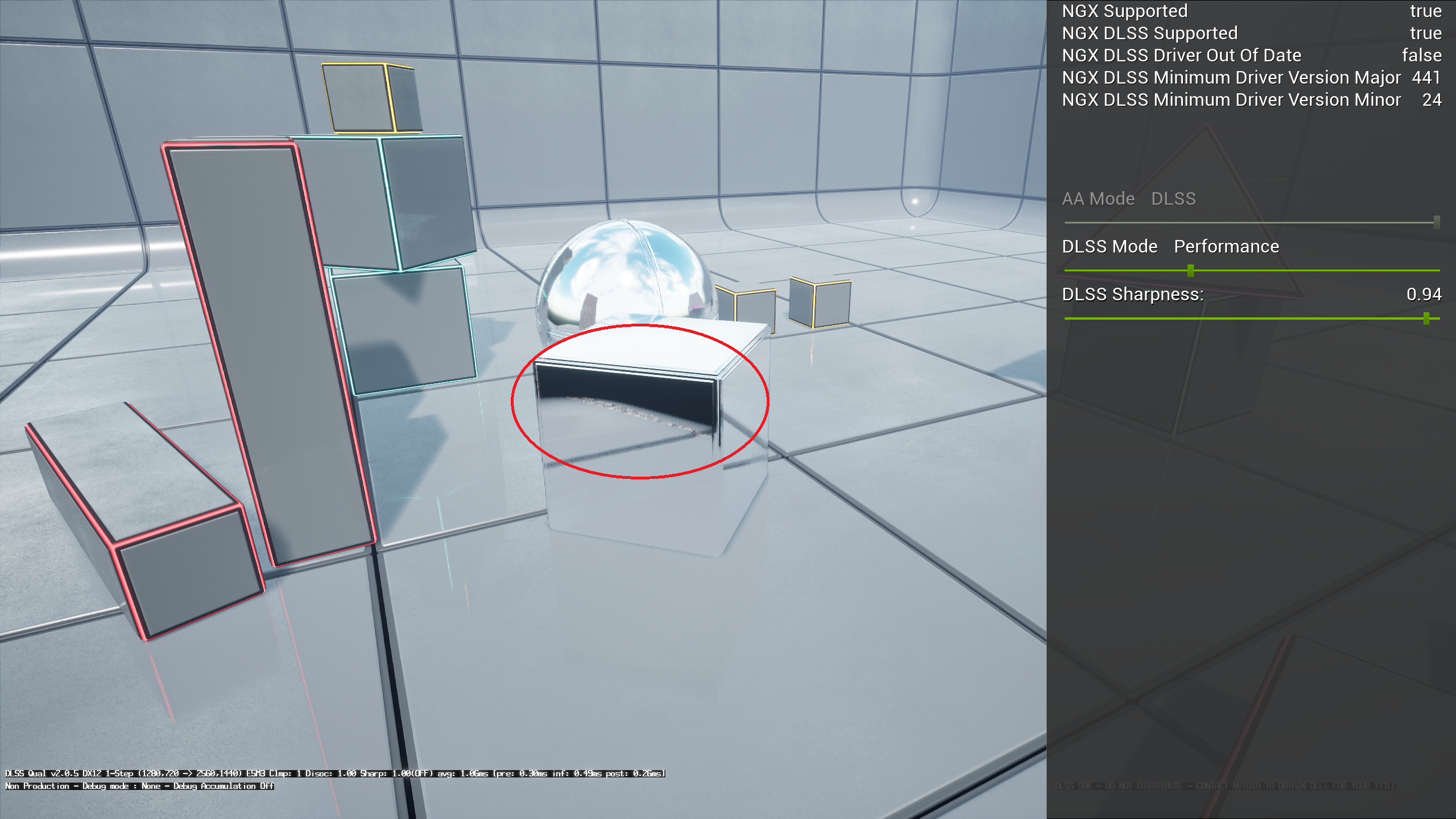
The failure mode, circled. The reflection terminates where the reflected geometry leaves the screen, because screen-space reflection has nothing left to sample.
Performance
This is one of the areas Vite has invested the most optimisation work in, because reflections are usually the second most expensive ray tracing effect after per-pixel GI.
Vite's reflections are capable of running at 4K native 60 FPS on a PS5-class GPU, as demonstrated by the Unreal Tournament Vite demo, which combines them with DDGI and tessellation. That configuration is the "Performance, high end" row in Performance Targets.
Further RT reflection performance work is ongoing, with the stated goal of reaching performance characteristics comparable to RE Engine's implementation as seen in Devil May Cry 5 Special Edition on PS5.
DDGI-lit reflections
The most important interaction in the renderer, and one of the concrete reasons Vite is built on the NvRTX branch rather than stock 4.27.
A reflection ray hits a surface. That surface needs to be shaded, which requires knowing the indirect light arriving at it. Without a global illumination representation available to the ray tracing pipeline, the options are to return direct lighting only (reflections of shadowed areas go black), or to fall back to a cubemap (reflections look wrong and static).
With DDGI active, the reflection ray samples probe irradiance at the hit point. Reflected surfaces are lit consistently with the rest of the scene, shadowed areas in reflections retain bounce light, and the whole image becomes coherent.
This is enabled by the engine-side integration rather than by a separate switch: run DDGI and RT reflections together and you get it.
Tuning
The controls that matter, in rough order of impact on cost:
Resolution. Reflections can be traced at reduced resolution and upscaled. This is usually the largest single saving available and the quality cost is modest on rough surfaces.
Maximum roughness. Surfaces rougher than this threshold fall back to cheaper techniques. Lowering it is very effective, because rough reflections are exactly the case where the expensive accurate answer is least visible.
Maximum bounces. Additional bounces are expensive and rarely visible outside of scenes deliberately built with facing mirrors.
Ray distance. Limiting how far reflection rays travel bounds cost in large open scenes.
Denoiser settings. Reflections use a denoiser, unlike DDGI. If you see boiling or ghosting in reflections under motion, this is where to look.
Which reflection algorithm runs
Vite has two ray-traced reflection implementations inherited from 4.27 and NvRTX: the older FRayTracingReflectionsRGS path, which supports hybrid reflections and reflected translucency, and the newer sorted deferred path.
In a default build, VITE_RT_PSO_DEBLOAT forces the sorted deferred path and compiles out the older one. This is the faster of the two and the one Vite's performance targets are measured against.
Consequences worth knowing:
r.RayTracing.Reflections.ExperimentalDeferredhas no effect — the deferred path is used unconditionally.Hybrid reflections and the reflected translucency controls below are unavailable.
Ray-traced reflection captures and reflection probes (
r.RayTracing.Reflections.RayTraceEnvironmentCaptures) are compiled out.Single layer water ray-traced reflections (
r.Water.SingleLayer.RTR) are compiled out.
See Compile-Time Switches to restore the full set.
Reflected translucency
By default, Unreal Engine 4 only blends the emissive colour of reflected translucent meshes when rendering ray-traced reflections, which makes glass and similar surfaces look wrong in reflections. Vite inherits the NvRTX option to render fully ray-traced translucent objects inside reflections:
Console variable | Purpose |
|---|---|
| 0 emissive only, 1 shading, 2 shading and refraction, 3 shading, refraction and absorption. Default 0. |
| Maximum ray-traced translucency bounces inside reflections. Default 8. |
| Stops the translucency walk when accumulated transmission falls below this. Default 0.1. |
Mode 3 gives the best result and the highest cost. In scenes with a lot of glass visible in reflections, the difference is substantial; in scenes without, leave it at 0.
When to use SSR instead
Screen-space reflections remain the right answer for the 4K120 stylised target and for any project whose minimum spec lacks DXR. SSR is dramatically cheaper, and in scenes without large flat reflective surfaces its failures are frequently not noticeable.
The cases where RT reflections earn their cost are wet streets, polished floors, water, glass architecture and vehicle paint — anywhere a large, smooth surface reflects something the camera cannot see.